Global — Design tools
Canva vs Figma vs Adobe Express, compared for branding
Three of the most popular design tools, compared by the job each is genuinely best for. The catch none of them fix: a tool gives you output, not memorability.
On this page
Canva, Figma and Adobe Express each win a different job: Canva for fast template graphics, Figma for systems and interfaces, Adobe Express for quick branded content. But all three give you output, not memorability. A tool renders your direction, it does not supply one, which is why two brands on the same app can look identical or unmistakable.
- Canva is best for speed and access, Figma for building a real design system, Adobe Express for branded content inside the Adobe ecosystem.
- None of the three decides whether buyers remember you. That is set by the idea, before you open any app.
- A tool scales whatever direction it is fed, so a generic starting point scales your sameness across every post.
- The honest test is recall, and the proof is in the work: see our case studies.
What is the real difference between Canva, Figma and Adobe Express?
You are comparing these three because you have marketing to ship and you want the right tool to make it. Fair. But notice the question underneath: you do not just want graphics, you want graphics that get your brand remembered. That is a different question, and no tool answers it. Here is the honest split by job.
Screenshots, where shown, are of each tool’s own homepage.
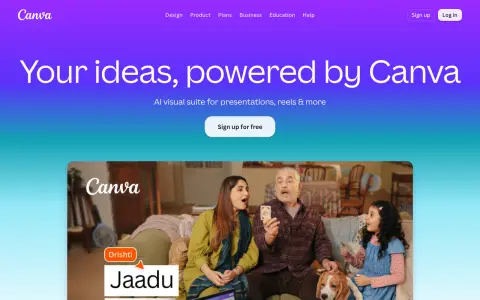
Best for: speed and access. Templates, drag and drop, and a library deep enough that anyone on a team can ship a decent social post, deck or flyer in minutes, no design background needed.
Watch for: the templates everyone else uses too. The default output looks like the default output, so without a real point of view you scale straight into the sea of sameness.
Makes you memorable: No, it renders output
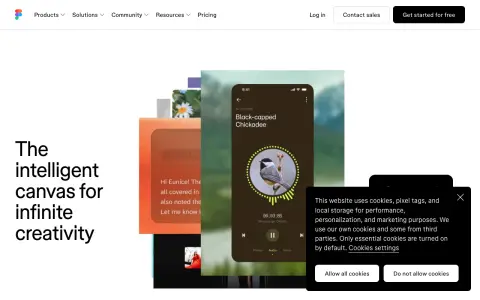
Best for: interface design and real systems. Components, shared libraries, version history and live collaboration make it the professional standard for product and brand systems built to be reused.
Watch for: the learning curve and the blank canvas. Figma gives you the power to build anything, which means it will just as faithfully build a forgettable thing if that is the direction you bring.
Makes you memorable: No, it renders output
Best for: quick branded content with Adobe polish. Brand kits, stock, generative features and a clean path into the wider Adobe ecosystem when you need to hand off to Photoshop or Illustrator later.
Watch for: it sits between Canva and the pro apps and fully owns neither lane. Like the others, its brand kit enforces consistency, not distinctiveness, and consistent sameness is still sameness.
Makes you memorable: No, it renders output
Here is the same three at a glance.
| Tool | Best for | Watch for | Makes you memorable |
|---|---|---|---|
| Canva | Fast template graphics, team access | Default templates read as default | No, it renders output |
| Figma | Systems, interfaces, collaboration | Curve; blank canvas needs direction | No, it renders output |
| Adobe Express | Branded content in the Adobe stack | Between two lanes, owns neither | No, it renders output |
Want to see where you blend into the AI average? Book your free Brand Clarity Call and get the design direction to stand out.
Which tool should I actually pick?
Pick by the job, not the hype:
- Ship marketing fast with a small or non-design team? Canva. It is built for exactly that and nothing here beats it on speed.
- Building a product, a design system, or anything that has to stay consistent across many screens and hands? Figma. It is the professional standard for a reason.
- Already in the Adobe world, or want brand kits plus quick generative content? Adobe Express. It plays nicely with the rest of Adobe.
But read the pattern in that list. Every choice optimizes how you make the thing. None of them touches whether the thing gets remembered. You can pick perfectly and still be invisible, because memorability is decided one step earlier, in the idea you feed the tool.
Why the tool is never the reason a brand is remembered
Here is the uncomfortable part. Two competitors can use the exact same app, the same fonts, even the same template, and one is unmistakable while the other disappears. The tool did not make the difference. The direction did.
A tool is an amplifier. Give it a generic starting point, a safe logo, a trend-chasing palette, a look copied from three competitors, and it will scale that sameness flawlessly across every post you ever make. That is the trap. The better the tool, the faster you can mass-produce forgettable.
What a tool cannot give you is the one true thing only you can own, the idea a competitor literally cannot wear. That is not a feature you unlock. It is a decision you make before you open Canva, Figma or Adobe Express. Get it right and any of these tools will express it well. Get it wrong and no amount of tool mastery saves you.
If you want to know where you stand before you commit to any tool or template, book your free Brand Clarity Call. Fix the direction first, then let the tool do its job. The proof is in the work: see our case studies. If you are weighing platforms more broadly, our best branding tools breakdown applies the same lens, and the branding agency in Singapore page explains how we work as a studio rather than a template.
Why memorability? Your buyer meets more look-alike brands every year and remembers fewer of them. The one they recall first is the one they buy, so memorability is the return on branding, and the only part a tool can never hand you.
FAQ
Which is best, Canva, Figma or Adobe Express?
It depends on the job. Canva is best for fast, template-driven marketing graphics anyone on the team can make. Figma is best for interface design and building a real design system with collaborators. Adobe Express is best for quick branded content that plugs into the wider Adobe ecosystem. None of them decide whether your brand is memorable, that is a direction problem, not a tool problem.
Can a tool make my brand memorable?
No. A tool gives you output. Memorability comes from one clear idea only you can own, expressed consistently, and none of these tools supply the idea. Canva, Figma and Adobe Express will all render whatever direction you feed them, including a forgettable one. That is why two brands using the same tool can look identical, or unmistakable. The difference is the thinking, then the tool.
Is Figma better than Canva for branding?
For building a reusable system, yes, Figma gives you components, shared libraries and version control. For getting a social post out in ten minutes, Canva wins. But neither answers the harder question, whether a buyer remembers you afterward. That is decided before you open either app.
Do I still need a designer if I use these tools?
For output, not always, the templates are good enough to ship. For memorability, yes. A tool scales whatever direction it is given, so a generic starting point scales your sameness. The value a studio adds is the one ownable idea and the distinguishable visual language, the part no template ships with.
Which tool do professional branding studios use?
Most use Figma for systems and interface work, with Adobe apps for detailed craft, and many keep Canva around for fast internal assets. But the tool is the last decision, not the first. The direction, the point of view a competitor cannot copy, is set long before anyone picks an app.
Don't be generic. Go unsafe.
Get the AI Branding Playbook, "Make It Feel Like Yours." How to give your AI real design direction so your brand stops looking like the template everyone else ships.
Get the AI Branding PlaybookDon't be generic. Go unsafe.
Book a free Brand Clarity Call. We put your brand next to the AI-average lineup, show you where you blend in, and give your AI tools the design direction to build something unmistakably yours. No pitch.